Actually local listings.
Thousands of nearby listings. Filters that work. And price comparisons backed by what actually sells.
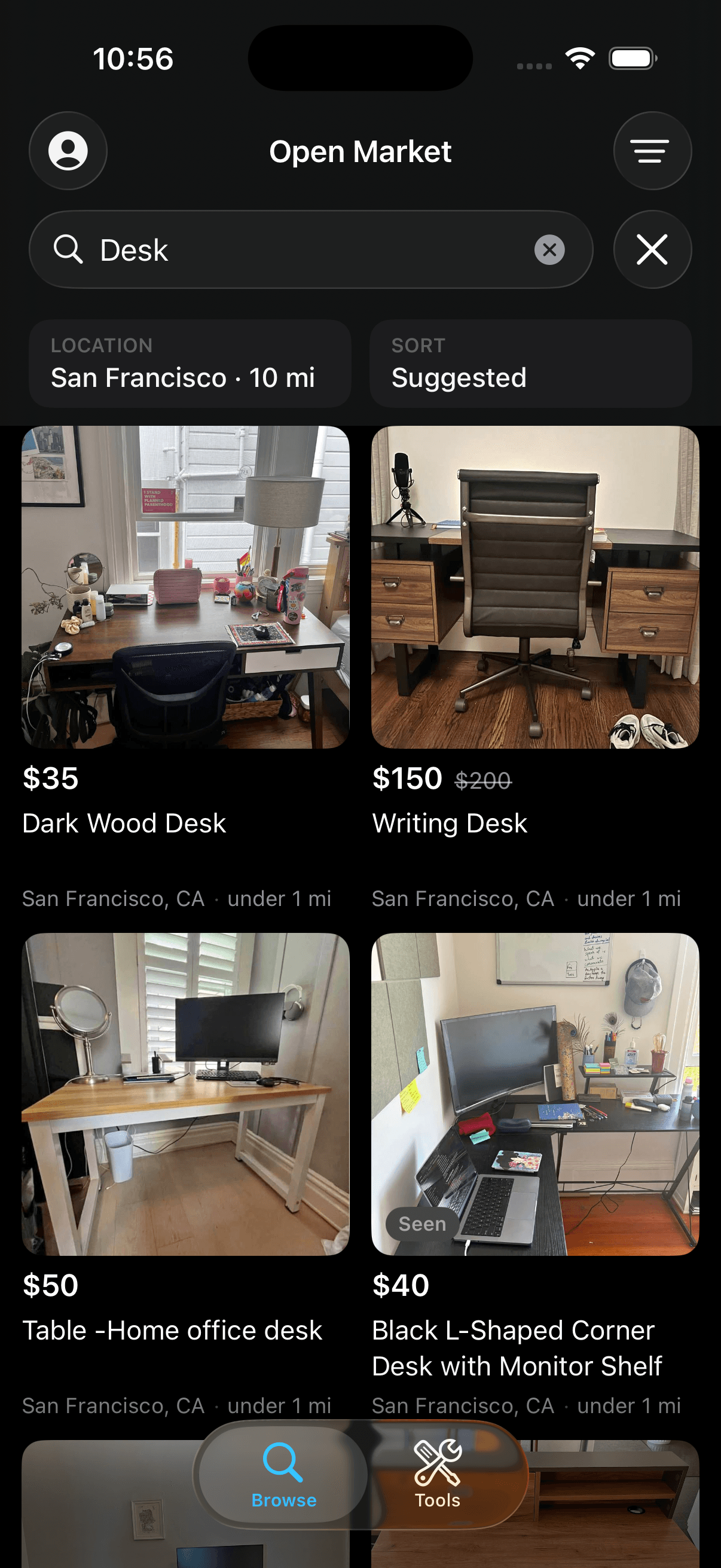
- Every card
- City + distance
- Radius
- Enforced on device
- Any listing
- Price comparison
- Sponsored posts
- Filtered out
Openmarket aggregates publicly available local listings, including those posted to Facebook Marketplace — thousands of nearby items, in one place you can actually search.
Nearby listings
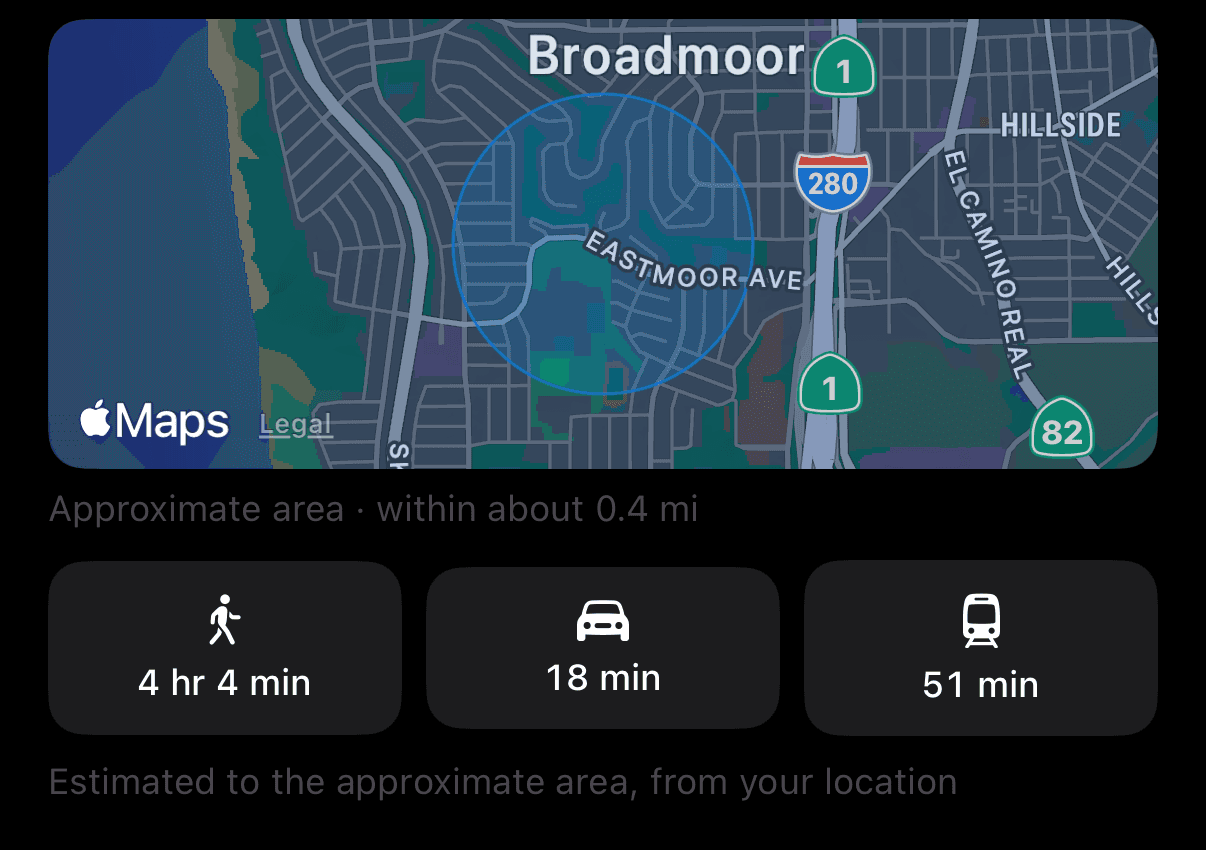
Set a place and a radius and they hold. A Marketplace search set to 5 miles can return listings 60 miles away; here the radius is enforced on your device, so anything outside it is cleared out before you see it. What's left carries its city and real distance on the card, and walking, driving, and transit time on the listing.
Filters that work
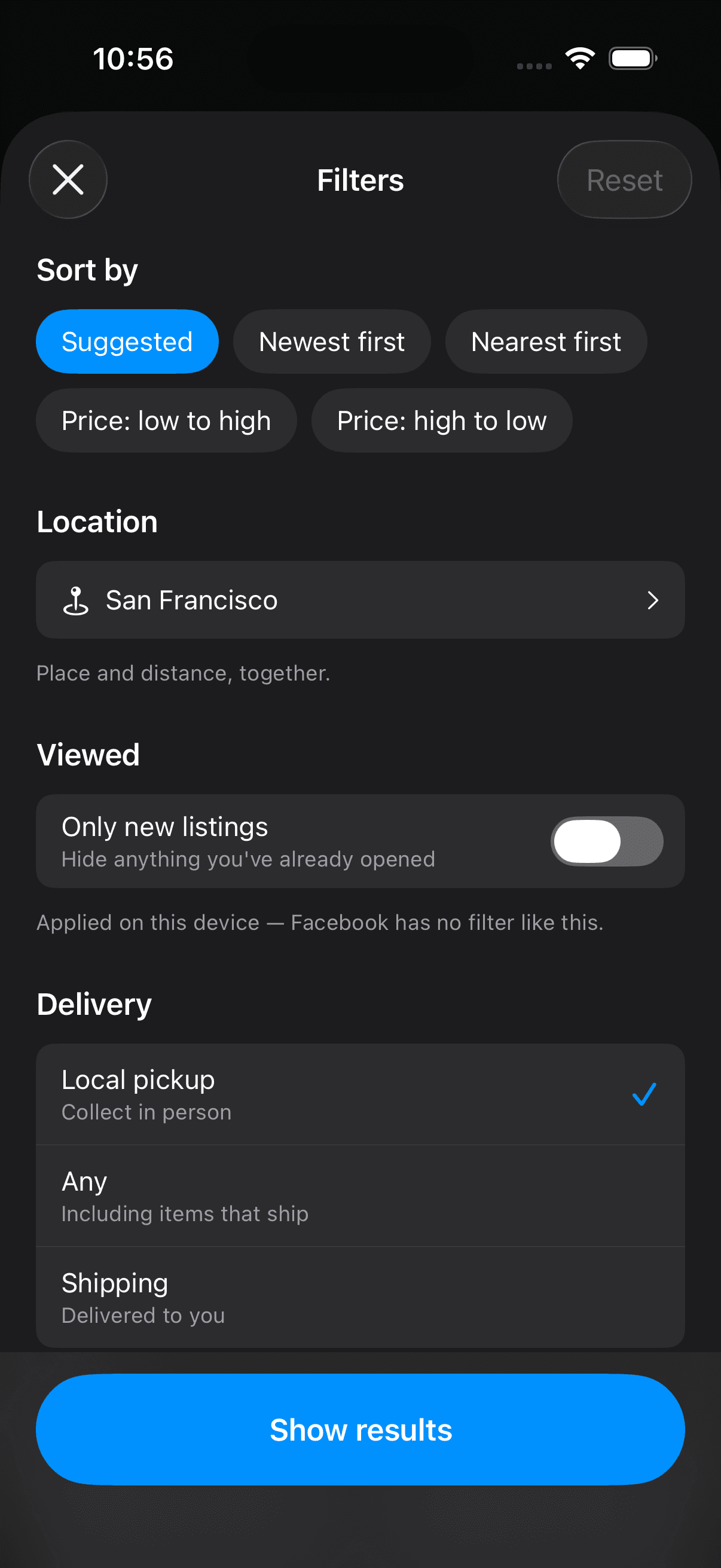
Sort by newest, nearest, or price. Narrow by price range, condition, and whether it ships or you collect it. Then flip on Only new listings to hide everything you've already opened — a filter with no counterpart on Marketplace at all. Sponsored posts never appear.
Price comparisons
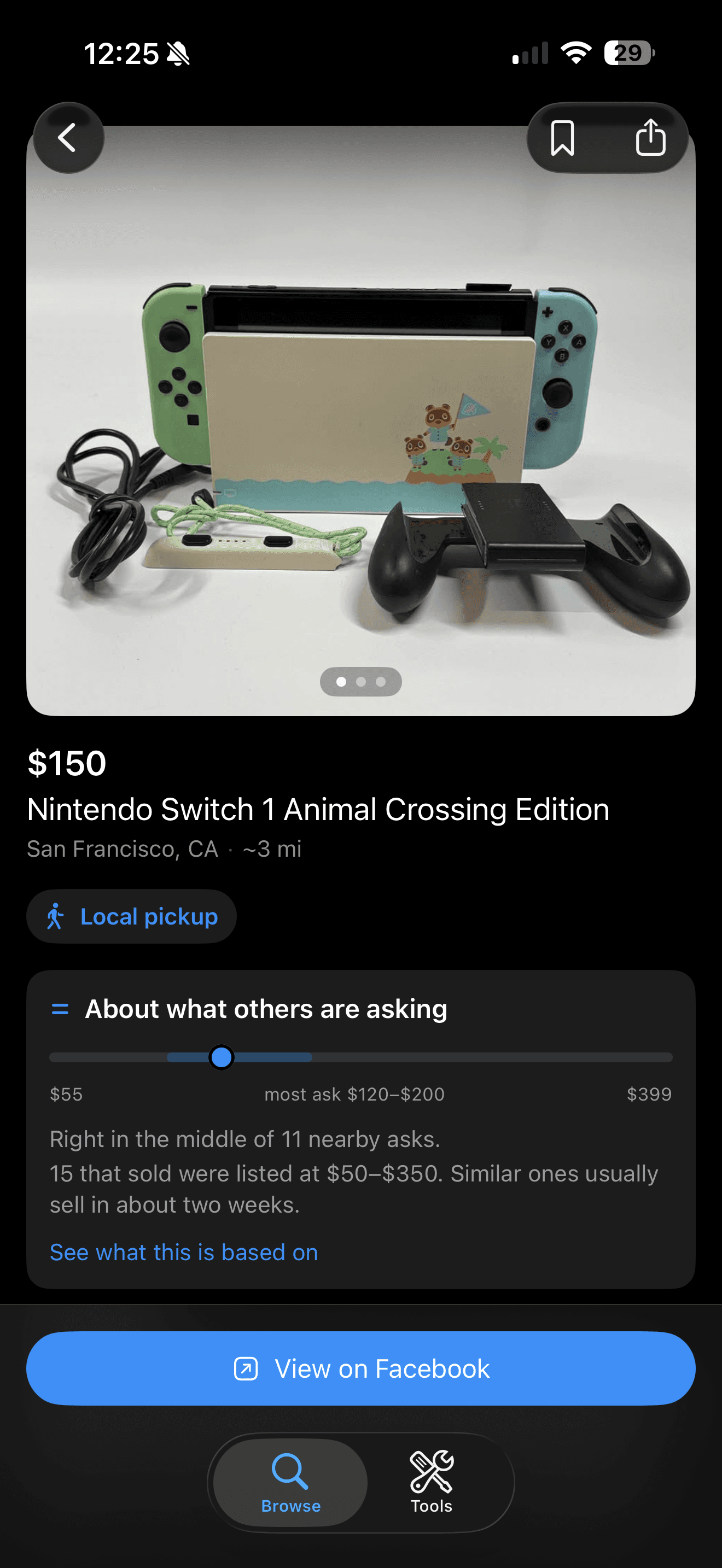
Any listing can be placed against similar ones near you — the low ask, the band most sit in, and the high — with the listings behind it one tap away. Buy without guessing; sell at the number that moves.
Search
Find what you're looking for
Intelligent search and powerful filters.
No sponsored posts. Sponsored cards are filtered out of every feed. What you see is what's actually for sale near you.
Saved and recently viewed. Every listing you open is kept. Back to “that desk from yesterday” in one tap.
Advanced filters. Hide things you've already seen, and narrow by price, condition, and pickup or shipping — then sort by newest, nearest, or price.
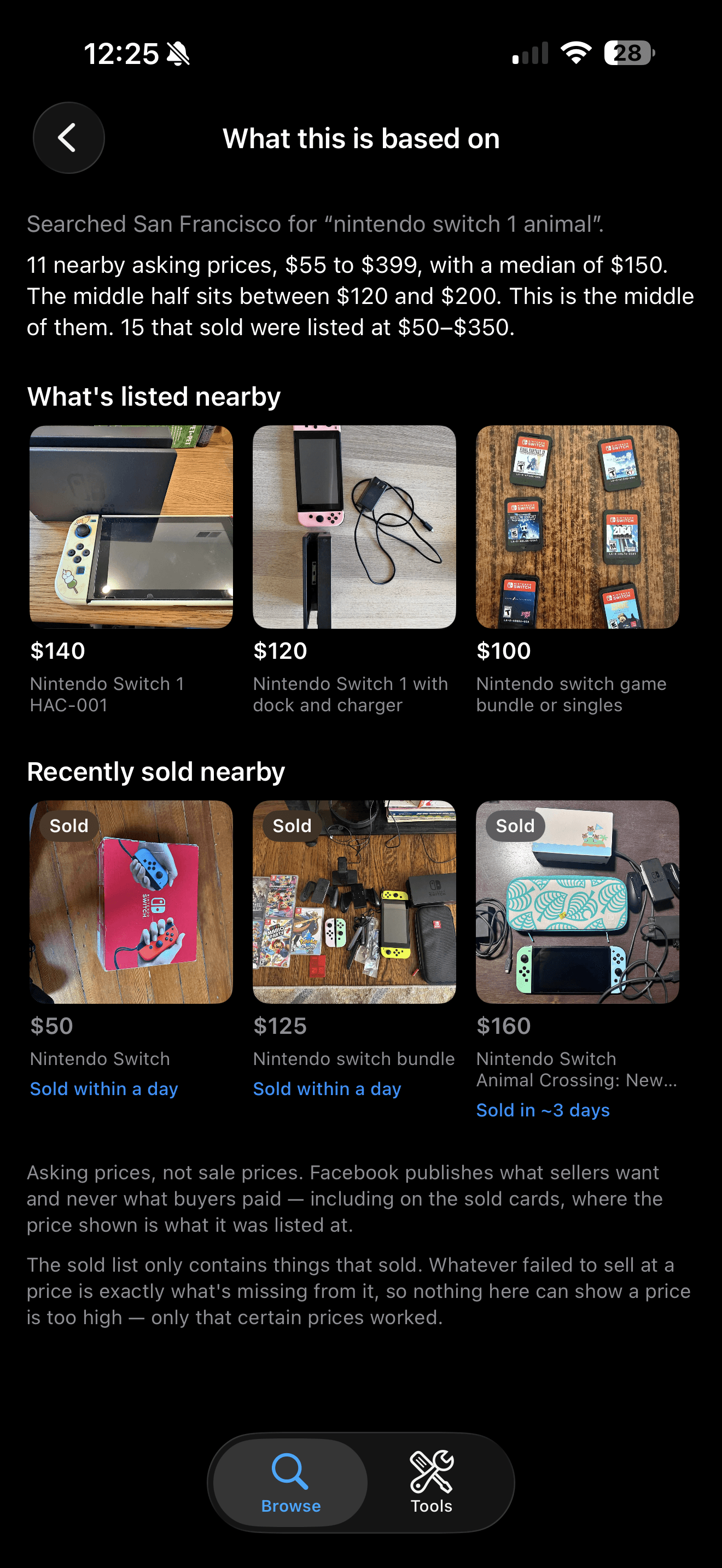
Price comparison
Never wonder what it's worth.
Compare with what’s listed. Where this price sits against every similar item for sale near you right now.
Compare with what’s selling. What recently sold nearby, and how fast it went.
Guides
How Marketplace actually behaves.
Field notes from our own testing, with the screenshots behind every claim.
Questions, answered.
- Where can I download Openmarket?
- Openmarket is now available on the App Store for iOS. Use any download button on this site to open the official App Store listing.
- What is Openmarket?
- Openmarket is an iOS app that helps you find local listings that are more relevant to you. Search around your location, filter by what matters to you, save your favorites, and hide listings you've already opened. Distance, travel times, and local price comparisons help you decide which items are worth a closer look.
- Where do the listings come from?
- Openmarket aggregates publicly available local listings, including those posted to Facebook Marketplace — thousands of nearby items. It doesn't run its own marketplace: you browse listings from the original source, and messaging and offers happen in the Facebook app.
- How is it different from browsing Marketplace directly?
- Three things Marketplace doesn't do: the distance radius is enforced on your device, so a 5-mile search stays within 5 miles; every card carries its city and real distance from you, and every listing carries walking, driving, and transit time; and any listing can be compared against similar nearby and recently sold listings in one tap. Sponsored posts are filtered out, and one toggle hides listings you've already opened.
- Is Openmarket affiliated with Facebook or Meta?
- No. Openmarket is an independent app. When you want to message a seller or make an offer, the app opens the original listing in the Facebook app — deals stay where sellers already are.
- Can I use Openmarket without a Facebook account?
- Yes. You can browse without a Facebook account or an Openmarket login. Choose a location and start finding listings that are relevant to you.
- What can I do without logging in?
- Search and browse nearby listings, scroll for more results, and narrow your search by distance, price, condition, and pickup or shipping. You can also save listings, revisit recently viewed items, and use Only new listings to hide anything you've already opened.
- What does signing in add?
- Signing in gives you access to additional features when you want them. You can start browsing without it.
- How does the price comparison work?
- Open any listing and Openmarket searches similar items near you — both what's listed right now and what recently sold — then shows where this listing's price falls against them on a range bar: the low ask, the band most sit in, and the high. It also estimates how long similar items take to sell. Tap “See what this is based on” to read the actual comparable listings it used.
- How do I message a seller?
- Tap “View on Facebook” on any listing and it opens that exact listing in the Facebook app, where you can message, save, or make an offer with your own account. Openmarket never sends messages for you.
- Is Openmarket on Android or the web?
- Not yet — Openmarket is iOS-only for now.
Openmarket is live on iOS
Download Openmarket from the App Store and start exploring nearby listings.